Showing posts with label Anco Software. Show all posts

Thursday, March 21, 2024

Game 405: Jump Jet


Jump Jet, listed on Mobygames by its 1988 Amiga release title Harrier Mission, simulates author Vaughan Dow's day job as a Sea Harrier FRS1 pilot. Flying a single-seat, single engine, subsonic jet fighter capable of VTOL thanks to its angled thrust nozzles, you must launch from your carrier, locate an enemy fighter, pursue and destroy it, and return to the carrier and land on it safely.

Getting this to work correctly was slightly tricky. First, there was the issue of realizing that no Commodore 64 game called Harrier Mission exists. Jump Jet is the correct title. Second, I found two disk images floating around. One of them refused to load. The other had completely unintelligible speech, and I couldn't quite put it out of my mind that this wasn't right, or that something else might be wrong too. But ultimately I wound up playing a T64 tape image, which loaded much faster than the disk version, and offered clear-sounding radio chatter (mostly "Mayday-mayday-mayday. I'm bailing out!" given my piloting skills).

The Sea Harrier's distinguishing characteristic is its angled jet nozzle, which may be oriented in four directions:

  • Vertical, used for VTOL and hovering. At this orientation, pitch controls forward/backward movement rather than altitude, and banking controls lateral movement without turning. Thrust power will control rate of climb.
  • 45°, used to build airspeed from hover. Thrust power controls rate of climb and forward acceleration; pitch and banking don't do very much at all.
  • Rear-firing; only effective when airspeed exceeds 180kn, otherwise transforms your jet into cannonshot. Handles like a conventional jet with maximum level speed of 600kn; pitch controls altitude, banking turns, and thrust controls acceleration.
  • 45° reverse, used for rapid deceleration. 
 

This is definitely more of a flight simulator than Dow's previous Flight Path 737. Gameplay is still stratified into phases, but where Flight Path 737 immediately ended the trip when you didn't follow procedures correctly, Jump Jet simulates the flight physics just enough to make you face the ramifications of your failure. When it can't do this (stalls are still not a thing, for instance), a warning light flashes, and too many of these will abort the mission.

A multilingual manual offers five pages of English instructions - this affords more detail than the two pages of terse liner notes offered by Flight Path 737, but is still a bit inadequate for explaining exactly what you need to do. There is also some flat-out incorrect information; the manual says that the skill level is selected by the computer and automatically advances upon a successful mission, but you have access to all five from the start. I had to trial and error my way through the first two, and faced a showstopping difficulty on the third.


Below is a walkthrough of skill level #2, "Flight Lieutenant."


Takeoff

Way easier than taking off from a runway. Pretty much the only way you can screw this up is by forgetting to lower the flaps first. The manual notes that a real Sea Harrier is equipped with 6,600 pounds of fuel, full arms, and must take off from a ski runway, but in this simulation, we only have 5,000 pounds, four missiles, and can take off from rest.

  • Press F to lower the flaps.
  • Press 3 to fire the jets vertically.
  • Hold '+' to increase thrust to maximum. At >75% power, you will ascend, and the silhouette over the landing zone shrinks.
  • At 50ft, the scene changes.


Takeoff, scene 2


  • Press 2 to fire the jets at 45°. You'll move forward, away from the carrier, almost immediately.
 

Sea flight


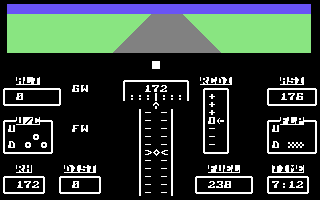
Here, the game switches to a first person sim-like perspective, and it looks kind of nice at first, with its animated waves, clouds, and horizon. But then you notice the cheapness of it all; there's almost nothing to look at here, banking doesn't tilt the horizon, which simply goes up and down in response to your pitch but is unaffected by altitude. Even Hellcat Ace on the Atari, a game I noted for its primitive pseudo-3D visuals and gameplay, was more convincing than this!

Your goal here is to locate the enemy fighter, which is represented by a triangle on the radar. The only other object here is the carrier, which spawns at a random distance and orientation from your origin even though you just took off from it.

  • Press 'R' to enter radar mode. Note that this will take flight control away from you until you exit radar mode, so don't do anything stupid like entering a dive before doing this.
  • A cursor will appear on the radar screen. Use the joystick to .slowly. move it onto the triangle and then press the fire button.
  • The enemy fighter will be 'selected,' and its distance to you will show on the radar.
  • Wait until your speed accumulates 180 knots, if it hasn't yet.
  • Press '1' to activate rear-firing thrusters.
  • Press 'F' to raise your flaps.
  • Press 'U' to raise the undercarriage.
  • Use the joystick to pitch up until you have attained at least 1,000ft of altitude. Do not let airspeed fall below 180 knots - reduce your pitch if it falls too low.
  • Use the joystick to level.
  • Use the joystick to bank and rotate to face the enemy's direction, and then level.
  • Approach to a proximity of 5 miles.


Dogfight


Here things become a real horror show of programming shortcuts as you finally see the enemy flit about all over your screen like an ant on crack. You see, the enemy plane doesn't fly in pseudo-3D space with any sort of attempt at modeling flight physics, but is merely a sprite that moves around your 2D screen space, moving up or down as it pleases, but never leaves your screen no matter how you maneuvers. You, unfortunately, still have to obey flight physics, which is why you'll want to approach with a somewhat high altitude; aiming downward makes you dive, and the enemy can't crash into the sea, but you can. A simple distance parameter causes the sprite to enlarge once the gap closes. The goal is to get the sprite inside your reticle and pull the trigger, which instantly destroys it. If the distance closes to 2 miles, it destroys you. Disengagement is impossible; you kill or be killed, and if you run out of missiles, tough luck.

The trick here is to use the reverse thrusters. Can't close the distance if you're moving backwards!

  • Press 'M' to turn on your missile sight.
  • Press '4' to engage reverse thrusters.
  • Use the joystick to get the enemy into your sight.
  • Fire.
 

Return to carrier

  • Press 'M' to turn off the missile sight.
  • Press 2 to fire the jets at 45°.
  • Press 'R' to enter radar mode. Again, make sure you aren't diving or banked, or this will go badly for you.
  • Use the joystick to move the cursor onto the carrier and press fire.
  • The carrier will be 'selected,' and its distance to you will show on the radar.
  • Use the joystick to bank and rotate to face the carrier's direction, and then level.
  • Wait until your speed accumulates 180 knots, if it hasn't yet.
  • Press '1' to activate rear-firing thrusters.
  • Reduce pitch, and approach carrier to a proximity of 5 miles. Level before altitude reaches 200 feet.
 

Carrier approach


This part was probably the most difficult to figure out. You've got to get very close to the carrier and enter a hovering descent, but the graphics and display don't make this easy to judge.

  • When the carrier comes into view, bank to center it.
  • Approach with an altitude as close to 200 feet as you can.
  • When somewhat close, level the plane and press '4' to activate reverse thrusters and rapidly decelerate. The exact distance will depend on your approach airspeed - you want come to a stop close to the carrier, but you don't want to overshoot.
  • When airspeed approaches 0, press '2' to activate 45° thrusters and reduce thrust power.
  • Adjust your thrust angle and power as necessary to inch forward.
  • Once you are very close - the carrier should be close to the bottom of your screen but not off it, press '3' to activate vertical thrusters and set power to 75%. You will decelerate and hover.
  • When airspeed reaches 0, reduce thrust. You will descend.
  • When altitude falls below 200ft and the game thinks you're close enough, the scene will change. You may still need to adjust thrust angle to get closer.
 

Landing


This part is tricky - almost certainly the most difficult part from an execution standpoint. And on higher difficulties it is so much worse.

If you enter this scene going more than a few knots, it's entirely possible that you might just fly away from the carrier before you have a chance to do anything, which aborts the landing and returns to seaflight mode, causing the carrier to magically spawn somewhere at random again! Yes, this happened to me, and it is frustrating.

  • Press '3' to activate vertical thrust.
  • Set thrust to 75%.
  • Use the joystick to pitch and bank to maneuver over the landing zone until you are directly over it and in a steady hover. This is very sensitive.
  • Press 'F' to lower flaps.
  • Press 'U' to lower undercarriage.
  • Reduce thrust. You will descend.
  • At 30 feet, the scene changes.


Touchdown

  • Increase thrust to 75%.
  • Use the joystick to pitch and bank to maneuver over the landing zone until you are directly over it and in a steady hover. You may lose altitude while doing this, and may need to increase thrust to avoid landing too soon, but easy does it - you don't want to climb too high either.
  • Reduce thrust below 75%. You will descend and land.
 

With higher difficulties, you must destroy multiple targets before landing, and the manual says there is a lower tolerance for warnings but I found this is incorrect; you fail after nine regardless of setting.

But the true difficulty factor is the weather. Being jostled around during seaflight is bad enough, but on levels 3 and above, you also have to fight the wind while landing. And I found this impossible.

Crashing your jet into the deck? That's six demerits.


GAB rating: Below average. Jump Jet is more ambitious than Flight Path 737 and gamier, so I feel I can evaluate it as a game, but the core here is bare bones compared to games I've called bare bones.

It's too bad, because there's some promise. The VTOL aircraft is cool. The presentation isn't half bad, with pleasing colors and animation. Ingame speech is pretty decent quality, the instruments are clear, readable, and well laid out, and the multiple perspectives involved with takeoff and landing, which itself is something I haven't seen in any earlier combat flight sim, are a neat touch.

But there's not enough to do here, and the flight simulation is half-baked and unconvincing. Air combat is pathetic - like an arcade game from the 70's, but honestly, I can't even think of one of those that doesn't look and feel better. Compare to Hellcat Ace, from three years earlier on Atari hardware, where the horizon tilted as you banked, up to two enemies could be present at once, and they at least seemed to follow the same flight physics as you, able to climb, dive, and maneuver off-screen and behind you. I called that simplistic.

It will be awhile before we return to Anco Software for a bona fide whale, and I'm not sure I feel all that enriched by this retrospective series, but hey, they can't all be winners.

Monday, March 18, 2024

Game 404: Flight Path 737

The green rectangle is just for show; instruments tell you everything.

The first of two Anirog games by professional jump jet pilot Vaughan Dow, Flight Path 737 is a flight simulator in the same sense that Activision's Space Shuttle is - very little of the physics of flight is actually simulated, but rather a simplified model of the procedure is, which you must follow to taxi, take off, ascend to a safe height, pass over a mountain range, and descend into a valley beyond and land on the runway safely. Do anything incorrectly and it is an instant fail, with a sometimes confusing abort message to announce your mistake.

"Accent to slow?" What? Ohhh... you mean ascent too slow!

Make no mistake, this is not an easy game. You will be needing to watch your airspeed obsessively. The safe speed range for any given phase is tight - deviate from this even a little bit and you fail The optimal speed range is even tighter, and on higher difficulties you cannot afford to stray from this or you will hit the mountains, or miss the runway, or just run out of fuel. There's no autothrottle; only keystrokes to adjust in 10 or 20 knot increments, and it increases or decreases on its own with pitch, drag, or, on higher difficulties, random engine fires. While climbing or diving, you'll need to adjust it constantly, and that's all the while keeping an eye on your other gauges and remembering everything else you need to do.

Gameplay is semi-realtime; with PAL timing, the game accepts one keystroke command and/or joystick direction per second, and instruments update at about this rate. It takes some getting used to, but it gives airspeed adjustment a tick-tock rhythm; one tick it goes up by five knots because you were diving, then you hit F5 and the next tock it goes down by five, and you repeat until an event happens.

A complete run takes no more than ten minutes, and six difficulties are offered, which I completed in sequence. "Part-time" is where things started getting really difficult.

Difficulty Mountains Runway Engine fires Landing tolerance Crosswinds
First solo 5000 feet 3 miles No Moderate No
Stunt pilot 6000 feet 3 miles Yes Moderate No
Part-time 7000 feet 2.5 miles Yes Strict No
Experienced 8000 feet 2 miles Yes Strict Yes
Professional 9000 feet 1.8 miles Yes Strict Yes
Test pilot 9200 feet 1.5 miles Yes Strict Yes


Below is my first and only successful "test pilot" run - the only such video on Youtube to my knowledge. There were many unsuccessful runs.


I did find that the cassette inlay instructions are a bit confusing and sometimes incomplete. Discovering the correct procedure took some trial and error, and in the process, I rewrote them for my own benefit.

Remembering the safe airspeed rules is paramount. You should always be paying attention to the ASI indicator, and always maintain a safe speed, no matter what else you are doing.

  • Airspeed must never fall below 160kn.
  • Airspeed may not exceed 200kn while the flaps are down.
  • Airspeed may not exceed 250kn while the undercarriage is down.
  • Airspeed may not fall below 180kn while the flaps are up.
  • 180kn-200kn is the only safe range for raising or lowering the flaps.


Taxi

  • Press F1 once to increase ground speed to 20kn.
  • Press V to lower the flaps.
  • Use the joystick to correct runway heading. Center once aligned.


Takeoff 

  • Press F1 eight times to increase ground speed to 180kn.
  • Pull joystick back to increase pitch and take off.


Ascent 


On all difficulties except first solo, engines can catch fire any time from here until the final approach! Pay attention to the FW indicator and if it lights up, immediately stop what you're doing and hit 'E' to extinguish it. Then adjust your throttle to recover any lost speed.

  • Increase pitch to +5.
  • Maintain airspeed between 185kn-200kn.
  • Once altitude passes 300ft, press F to raise flaps.
  • Press F1 to throttle up.
  • Press A to raise undercarriage.
  • Press F1 repeatedly to reach 410kn.
  • Press F3 every two seconds to maintain 410kn airspeed.


Cruise

  • Once altitude is within 400ft of the mountain tops, use joystick to level pitch.
  • Press F7 repeatedly to lower speed to 180kn-200kn.
  • Press V to lower flaps.
  • Press Z to lower undercarriage.
  • Use joystick to correct runway heading. Center once aligned.
  • On higher difficulties, it may be necessary to begin RH alignment early and multitask.
 

Descent

  • Once 'GW' light turns off, you have cleared the mountains. Depending on how long it took you to perform RH alignment, this may have already happened.
  • Use joystick to lower pitch to -5. Airspeed will increase 5kn per second as you dive. Let it approach 200kn, but never exceed it.
  • Press F5 every two seconds to maintain airspeed.
  • When the altitude is about equal to [distance*100], press F7 once and raise pitch to just one notch below level.
  • On test pilot mode, you will be very lucky if this is above 500ft. It's entirely possible that you completely pass the runway during descent! In which case, too bad.


Final Approach

  • Reduce airspeed to 160kn-170kn. Maintain during final approach.
  • At 10 distance, an ILS light flashes.
  • At higher difficulties, this has probably already happened.
  • White means you must lower your pitch.
  • Red means you must raise your pitch.
  • Green means you are on track to land.
  • Once green, set pitch to -1.
  • At higher difficulties, crosswinds interfere with your RH. Adjust accordingly.
 

Landing

  • Once altitude reaches 100ft, increase airspeed to 170kn-180kn.
  • Once altitude reaches 0, immediately level pitch.
  • Press R to activate reverse thrusters.
  • Press F7 repeatedly to reduce speed to zero.


GAB rating: N/A. More of an education product than a full-fledged game. Like other computer flight simulators, I don't feel it makes a great deal of sense to evaluate this as I would a game designed to entertain, but I don't get the impression that this is the most polished or most professionally-developed product out there. Microprose's Solo Flight outclasses this in every regard imaginable.

Saturday, March 16, 2024

Games 401-403: Early Anirog Software

Sometimes, Data Driven Gamer's early company retrospectives are the most personally rewarding part of the blogging experience. I get to experience the seldom-played formative products of a culturally significant brand, and see how it would lead to the games we know and love.

Other times, it's a company I'd have otherwise never heard of, whose major products are games I've never had interest in, and the only reason I'm playing them to begin with is to ensure there aren't any gaps in my knowledge.

Such is the case with Anco Software, originally known as Anirog Software, which sounds like a corruption of "Analog" but is named after founders Anil Gupta and Roger Gamon. A major British publisher best known for the Kick Off and Player Manager football series, Anco published over a hundred titles during its 20 year lifespan, making it comparable to big U.S. publishers like Broderbund. But while the name Broderbund evokes the image of numerous computer game classics, Anco evokes none for me. Selecting titles representative of their early output is difficult!

At least, as it appears to be, Anco favored Commodore computers over Sinclair early on. Good, I say - I'd much rather emulate a VIC-20 than a ZX81 again.

Game 401: Cavern Fighter


An utterly dreadful clone of Konami's Scramble. The controls, which use the p/l/;/. cluster to move are uncomfortable and I can't image they're much better on a real PET or VIC-20 keyboard. The space bar, when it works, fires missiles and drops bombs at the same time, but with the game's broken collision detection, either are just as likely to pass through your target as they are to hit and you can't fire again until both of them have left the screen.

At least the game's pretty easy... on the easiest setting. Crank it up and it gets near impossible, though only because the speed increases and the controls don't get any more lenient.

GAB rating: Bad.


Game 402: Pharoah's Tomb


This one seems based on Atari's Adventure, though at least it isn't an outright clone in the same sense that Cavern Fighter is. We need to emulate a 16kb RAM expansion to make it work, which can break other VIC-20 games that don't need it. The ingame instructions tell us that we're here to search for the ancient king's magic triangle, buried deep within his trap-filled tomb. Some creatures lurk inside which can cause harm, eventually but not immediately resulting in death. You can also starve if you take too long.

Controls are still the p/l/;/ cluster.,which still isn't great, but less awful for an adventure-type game. Too bad the movement speed is agonizingly slow. I grab the hammer - I'm not exactly sure what it does, but you can carry more than one thing - and go in.


There's a key here, which I get, and what looks like a door, but it won't open. So I keep going north.


A friendly lizard man walks around here. Well okay, he's not that friendly, as prolonged contact will kill you. But maneuver around him, using the stochastic trees to block his path, and you can leave.

To the right is a dark room.


Walking around will probably get you killed. Better not go here yet - go left instead, which takes you through a filler room with more trees, and then to a little maze.


The "Ad" pickup gets you an ad.


Going left enters another dead-end.


That 4,000 year old apple looks tasty, but the door here doesn't open yet. Good thing the door to the right opens. 


That Space Invader paces left and right, and there doesn't seem to be any way to get through without touching it. Thankfully, you pass right through it, but there's no way to query how much damage you take doing this.

Lest this isn't clear enough, your movement speed is slow, and the controls are sluggish and unresponsive. Getting through this one screen alone takes more than a minute.

Huh, this looks familiar.

Inside the castle is another junction.


Here, both doors will open, but you don't want to go into the room in the upper-left. It fills with sand, burying you. To the right is another dead-end.


The door here doesn't open yet. So we go north instead.


It's a lamp, I think. I grab it, and continue west through these caves, past a room with an easily avoided bat, and into a chamber beyond.


I have no idea what that blue thing is supposed to be, but the door here opens, so I take it. And begin the long, slow walk back to the dark room near the pyramid entrance.


Thanks to the lamp (I think), we can see it's full of holes. And more holes open up as you walk around - if one randomly opens up right underneath your feet, or they open up in a manner that makes it impossible to return to the door, sucks to be you.

I get the shovel and go back. Carefully. The shovel lets me get that... thing from the room with the sand trap, and then I can open the door in the room with the river and cross to the right.


I grab the key here.

Now, do I go into the room up north, or do I go back and see what this key can unlock?

I try the new mystery room first.


Ok, what happens if I grab the '?' pickup?


Of course. I get surrounded by frickin' lasers is what happens. Touching them kills you.

But getting the key and backtracking isn't any better. Not now.

You should have packed a lunch, Birmingham Smith.

I have no idea how to get any farther and I don't care. This adventure sucks.

GAB rating: Bad.


Game 403: Skramble

That disclaimer is rich coming from this game.


We're back to Scramble clones again - seems there were a lot of U.K. Scramble clones called Skramble, but this one is Anirog's, and this time the lead platform is the Commodore 64. At least I think it is - a VIC-20 version was also released the same year, but the C64 version is credited to Darrell Etherington, the author of the original Cavern Fighter.


And it's actually fairly competent! Or at least it seems that way compared to Etherington's last version. It's smooth for a computer game, though not quite arcade smooth. You still fire missiles and drop bombs with the same button, but at least this version is joystick compatible, and the collision detection works fine.

Skramble is not a challenging game - it has no difficulty options, and I beat the initial six-stage loop on my first try and didn't feel like continuing. It's also a nearly 1:1 replica of Scramble - itself not the most challenging arcade game of its day - right down to the stage layouts and the final challenge of bombing a tricky target by the "Anirog" headquarters. Not one iota of gameplay is original here, folks, giving me not much to talk about.

GAB rating: Average.

Most popular posts